

Highlights of the Latest FolderSizes Release
Modernized Ribbon Bar
FolderSizes 10 introduces a completely redesigned main window ribbon bar with a cleaner, more intuitive command layout. The new ribbon features a compact (simplified) mode for users who prefer a streamlined interface, along with a built-in command search feature that lets you quickly find any function by name. A layout reset button makes it easy to revert the ribbon to its default configuration at any time.

Goal-Oriented Welcome Screen
A redesigned welcome screen greets users with a task-oriented dashboard, making it easy to jump straight into the most common workflows. One-click shortcuts provide instant access to key actions like scanning your system drive, viewing file reports (largest files, oldest files, duplicates, temp files, and more), and launching popular searches (huge files, empty folders, old documents, long paths).
You can also choose from multiple visual themes directly from the welcome screen.

Heat-Tinted Detail Reports
FolderSizes 10 adds metric-based heat tinting to the folder size detail report, allowing you to instantly spot storage hotspots at a glance. Heat tinting can be applied to the size, size on disk, file count, and folder count columns, giving you a color-coded visual overlay that highlights the most significant values in each column. This makes it far easier to identify the largest consumers of disk space when scanning deep folder hierarchies.

Capacity Planning View
The disk reporter now includes an integrated capacity planning view, empowering IT administrators and storage managers to project future disk space needs based on historical usage trends. Combined with the existing disk space history tracking, this gives you a comprehensive view of where your storage has been and where it's headed.

New File Reports
FolderSizes 10 introduces two entirely new file reports designed to help organizations understand what's consuming their storage and when files were created or modified.
Non-Business Files Report
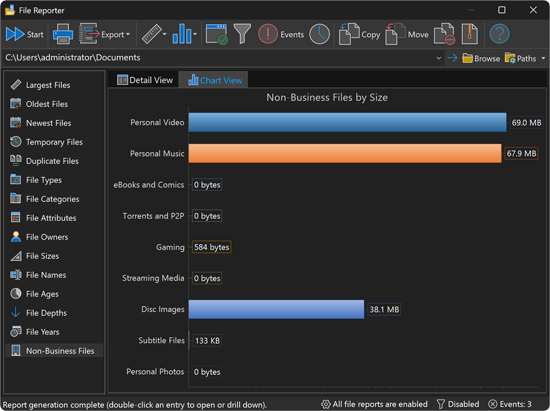
The new Non-Business Files report automatically identifies and categorizes personal or non-work files that may be consuming valuable storage. It detects files across several customizable categories, including personal video, personal music, eBooks and comics, torrents, gaming files, streaming media caches, disc images, and subtitle files. Each category shows file count, total size, size on disk, and percentage breakdown. Categories are fully customizable, so you can tailor the report to your organization's policies. Double-click any category to drill down into the matching files.
File Years Report
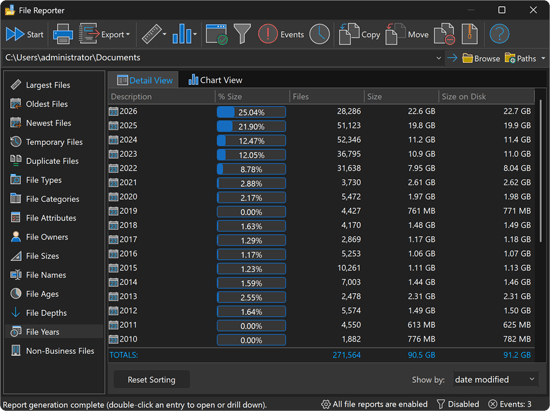
The new File Years report categorizes all scanned files by the year they were created, last modified, or last accessed. This provides a clear timeline view of your file system, showing file count and total size per year. It's an excellent tool for identifying aging data, understanding growth patterns, and supporting data retention policy decisions. Double-click any year to search for all files from that period.
File Metadata Search
FolderSizes 10 adds the ability to search files by their embedded metadata properties, such as author, title, tags, comments, and other document or media attributes exposed by the Windows property system. Multiple match types are supported, including contains, equals, starts with, ends with, and regular expression pattern matching. This powerful capability lets you answer questions like "find all documents authored by a specific person" or "locate media files with specific tags."

CLI and Scheduling for Trend Analysis
The trend analyzer is now fully accessible from the command line interface and the task scheduler, enabling fully automated, unattended trend analysis workflows. You can import snapshot data from single or multiple files, export history, subfolder change, and owner history reports in batch, customize visible columns and sort orders, and even distribute reports by email - all without opening the application. Date stamping, event logging, and automatic exit options make it ideal for integration into scheduled IT management workflows.
Additional Improvements
FolderSizes 10 includes many more enhancements across the entire product.
- Added Non-Business Files and File Years reports.
- Added scan options for skipping cloud folders and placeholder files.
- Very large Excel data exports can now span multiple worksheets.
- Improved untracked file presentation in treemap and sunburst charts.
- Added new folder creation button to folder report detail view.
- The file operations dialog now supports in-place NTFS compression.
- Improved duplicate file comparison performance in larger scans.
- Sunburst visualization now honors corner rounding chart option.
- Improved and consolidated tooltip styling throughout the application.
- Added value labels and subtle segment breaks to the bar chart view.
- Product update notifications now appear inside the main window frame.
- Task scheduler now fully supports export for all disk report views.
- File reports are populated much more quickly upon scan completion.
- Overhauled main window view printing to produce much better results.
- Memory and performance optimizations across many report types.
- Expanded product help documentation in numerous areas.
- HTML folder tree exports have improved layout and styling.