
Introducing Sunburst Charts in FolderSizes v9.8: A Radiant New Way to Analyze Disk Space
FolderSizes v9.8 is here, and with it comes a visually stunning and intuitive new way to understand your disk space usage: the Sunburst Chart. This powerful new report type offers a dynamic and interactive method for visualizing hierarchical file systems, allowing you to quickly identify where your valuable disk space is being consumed.
What is a Sunburst Chart?
Imagine your file system, with its nested folders and subfolders, laid out in a circular, multi-level pie chart. That’s essentially what a Sunburst Chart is.
- The Center: The innermost circle of the Sunburst Chart represents the root folder you’ve selected for analysis.
- Radiating Rings: Each subsequent ring moving outwards represents the next level down in the folder hierarchy.
- Segment Size: The crucial aspect is that the size of each segment (or “slice”) within a ring is directly proportional to the size of the folder (and its contents) it represents relative to its parent. A larger segment means that folder is consuming more space.
This hierarchical, proportional representation makes it incredibly easy to spot large directories at a glance, no matter how deeply they’re buried.
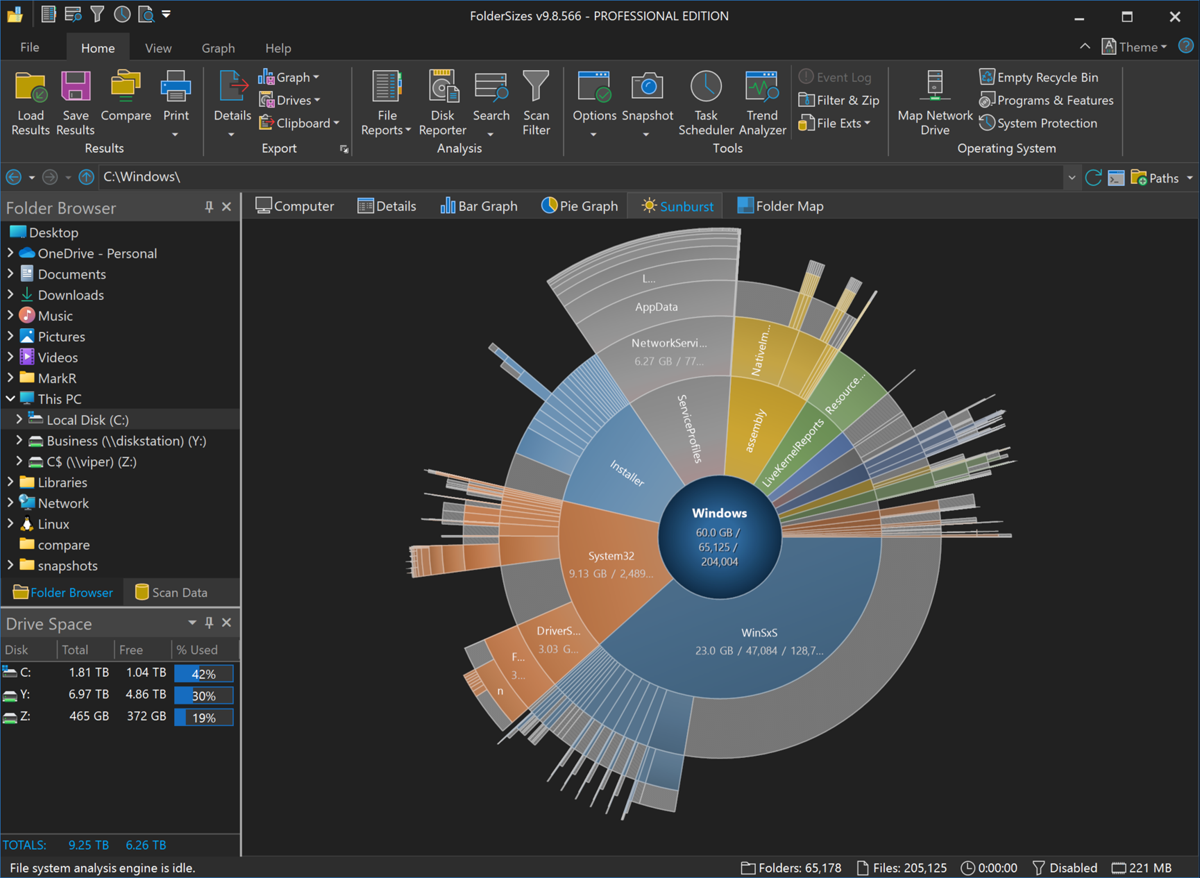
How Sunburst Charts Revolutionize Disk Space Analysis
Traditional tree views and detailed listings are invaluable, but the Sunburst Chart in FolderSizes v9.8 brings a new dimension to disk space analysis:
- Immediate Visual Impact: Forget sifting through long lists of folders and numbers. The Sunburst Chart provides an instant overview. Large, space-hogging folders pop out visually, demanding your attention. The use of gradient sector fills further enhances visual clarity and aesthetic appeal.
- Intuitive Drill-Down: The Sunburst Chart isn’t just a static image. Simply click on any segment representing a folder, and the chart can re-center and expand on that specific branch, allowing you to explore deeper into its subfolder structure with the same intuitive visual cues. This makes navigating complex directory trees effortless.
- Contextual Understanding: By visualizing the entire hierarchy at once (or a significant portion of it), you gain a better understanding of how space is distributed across different branches of your file system. You can see not just that a folder is large, but also how its subfolders contribute to that size.
Key Features of Sunburst Charts in FolderSizes v9.8
Beyond its core visualization capabilities, the Sunburst Chart in FolderSizes v9.8 comes packed with practical features:
- Exporting Options: Need to share your findings or keep a record? You can easily export the Sunburst Chart to an image file (e.g., PNG, JPG) for inclusion in reports or presentations. You can also copy it directly to the Windows clipboard for quick pasting into other applications.
- Scheduled Reports: Integrate Sunburst Charts into your regular disk space monitoring routines. FolderSizes allows the Sunburst Chart to be included in scheduled reports, so you can automatically generate these insightful visuals on a recurring basis. This is perfect for tracking space consumption trends over time.
Getting Started with Sunburst Charts
Using the new Sunburst Chart in FolderSizes v9.8 is straightforward. After performing a scan of your desired drive or folder path, you’ll find the Sunburst Chart available as a new report view. Explore its interactive nature, drill down into interesting areas, and see for yourself how it can transform your approach to managing disk space.
The addition of the Sunburst Chart further solidifies FolderSizes’ position as a leading tool for comprehensive disk space analysis, providing users with yet another powerful and intuitive way to reclaim and manage their storage effectively.
Visualizing Storage Space: Treemaps for File System Analysis
In the digital age, the management of computer storage has become increasingly complex. With hard drives now routinely measured in terabytes, understanding what’s taking up space on your system can be challenging. Enter treemaps: a powerful visualization technique that transforms abstract file sizes and hierarchies into intuitive, interactive graphics.
What Are Treemaps?
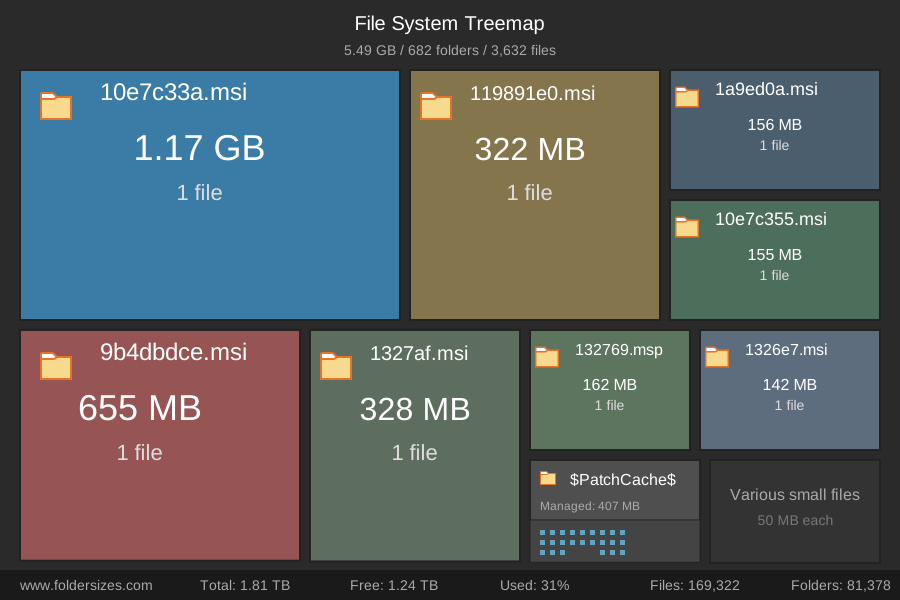
Treemaps are a visualization method that displays hierarchical data using nested rectangles. The concept was developed by Ben Shneiderman at the University of Maryland in the early 1990s. In a treemap:
- Each rectangle represents a data point
- The size of each rectangle corresponds to a quantitative variable (such as file size)
- The rectangles are arranged in a way that fills the display space without gaps
- Color can be used to represent categories or another data dimension
This approach makes treemaps exceptionally good at showing both the overall structure of data and the relative size of individual elements simultaneously—something traditional file browsers struggle to accomplish.
Why Treemaps Excel for File System Visualization
Standard file explorers present directories as expandable lists, which are excellent for navigating but poor at conveying size relationships. Here’s why treemaps are particularly valuable for understanding storage usage:
- Instant Size Context: With a glance, users can identify which files and folders consume the most space. The larger the rectangle, the more storage it occupies.
- Hierarchical View: Treemaps maintain the parent-child relationships between directories and files while showing everything at once.
- Pattern Recognition: Color coding by file type, date, or other attributes enables users to spot patterns and anomalies quickly.
- Efficient Use of Screen Space: Treemaps maximize information density, showing thousands of files in a single view without scrolling.
The conceptual treemap diagram below helps to illustrate these ideas.
Practical Applications
Treemaps serve numerous practical purposes in file system management:
- Disk Cleanup: Identifying storage hogs becomes trivial, making cleanup decisions more informed.
- Storage Planning: Understanding how space is currently allocated helps in planning future storage needs.
- Backup Strategy: Visualizing which directories contain the most critical data can inform backup priorities.
- System Optimization: Developers and IT professionals can identify bloated application directories or inefficient storage usage.
FolderSizes: Bringing Treemaps to Windows File Management
While there are several tools that utilize treemaps for storage analysis, FolderSizes stands out as a comprehensive solution for Windows users. This professional utility includes a powerful treemap view that transforms abstract directory structures into intuitive visualizations.
FolderSizes’ implementation is particularly noteworthy for several features:
- Interactive Navigation: Users can click on rectangles to zoom into specific directories, making exploration intuitive.
- Detailed Information: Hovering over elements reveals additional metadata like file counts and modification dates.
- Customizable Display: Color schemes can be adjusted to highlight different file attributes such as type, age, or owner.
- Filtering Options: Users can focus the visualization on specific file types or size thresholds.
- Export Capabilities: Visualizations can be exported as images for documentation or reporting.
For system administrators, IT professionals, and even everyday users looking to better understand their storage usage, treemap visualizations like those provided by FolderSizes offer an invaluable perspective that traditional file explorers simply cannot match.
Conclusion
Treemaps represent one of the most successful applications of information visualization to everyday computing challenges. By transforming abstract file system hierarchies into intuitive spatial representations, they enable users to understand and manage their storage more effectively than ever before. Whether you’re cleaning up an overcrowded hard drive, planning storage upgrades, or simply curious about where all your disk space went, treemap visualizations provide insights that would otherwise remain hidden in folder after nested folder of your file system.
FolderSizes 9.7 is Available
We’re excited to announce the latest version of FolderSizes, packed with significant improvements and critical bug fixes to enhance your file system analysis experience.
Key Improvements
FolderSizes v9.7 brings enhanced compatibility with official support for Windows Server 2025, ensuring seamless operation on the latest server platforms. The user interface has received substantial refinements, including improved default UI element font sizing, enhanced folder map layout with optimized aspect ratios and margins, and dynamic gradient rendering for more visually appealing displays.
Reporting capabilities have been significantly expanded. The new version introduces extended file size report default ranges, adds a ’20-60 Years’ default range to file age reporting, and greatly expands File Categories report groups. A notable new feature allows file extensions to be contained in multiple File Categories, providing more flexible and comprehensive file classification.
Our technical optimizations include improved NTFS MFT file residency test heuristics, an optimized default XSLT template for XML exports, and enhanced trend data import procedures. The toolbar icon states now more accurately reflect the current theme selection, improving overall user experience.
Bug Fixes
Our development team has meticulously addressed several critical issues that could impact system performance and user experience. We’ve fixed an incorrect snapshot node owner serialization problem, resolved rare buffer overflow scenarios during snapshot import, and eliminated snapshot generation concurrency issues.
We’ve also resolved rare unhandled exceptions that could occur when loading scan data and fixed limitations in drilling down into very large file report size ranges. These fixes ensure more stable and reliable performance across various system configurations.
Upgrade Today
Update to FolderSizes v9.7 to take advantage of these comprehensive improvements and enjoy a more robust file system analysis tool. Our latest version represents a significant step forward in file system management and analysis capabilities.
FolderSizes Website SSL Security Rating
At Key Metric Software, we’ve always prioritized security alongside performance and functionality. One way we demonstrate this is to achieve an A rating on the SSL Labs Security Test across all of our product websites.
This top-tier rating reflects our commitment to maintaining robust encryption standards, ensuring that all communications between our users and the website are secure. With the growing importance of online security, this recognition highlights our continuous efforts to provide a safe, reliable, and trustworthy experience.
Our flagship product, FolderSizes, is trusted by government agencies, Fortune 500 companies, and organizations like NASA, so it’s only fitting that we extend the same high level of security to our online services. Rest assured, as we continue to innovate and enhance our disk space analysis software, security will remain a top priority.
Thank you to all our users for your continued support!
FolderSizes v9.6 Now Available
Key Metric Software is proud to announce that FolderSizes v9.6 is available for download.
This new release introduces several important updates, including a wealth of performance enhancements that make common tasks faster than ever. Performance related updates include a faster regular expression filtering engine, much quicker column sorting, faster date and time calculations, snapshot data imports, and more.
We’ve enhanced the FolderSizes user interface with improved dark theme icon support, new themed dialogs, a new dark more splash screen, and much more.
FolderSizes v9.6 also introduces a core subset of product features for free, with more advanced features available via the purchase of a professional edition license.