
A NEW PERSPECTIVE ON DISK SPACE
Visualize Disk Space with Sunburst Charts
FolderSizes offers a beautiful way to visualize your disk space usage with the sunburst chart. This innovative visualization technique allows you to see your entire storage ecosystem at a glance, making it easier to identify large folders, understand their relationships, and make informed decisions about storage management.
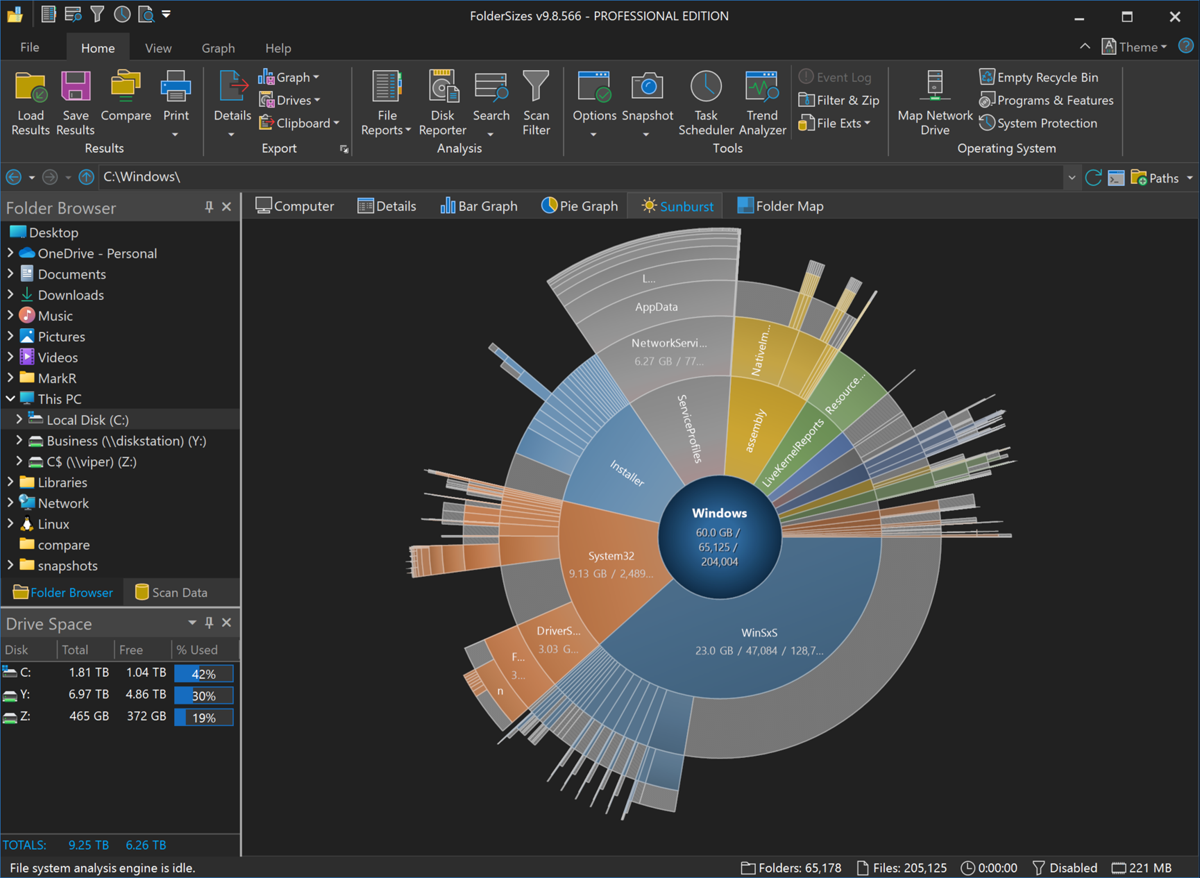
The Sunburst Chart provides a clear and intuitive way to visualize your disk space usage. You can easily see which folders are consuming the most space, and how they relate to each other. This makes it easy to identify large folders that may be candidates for cleanup or archival.
What Is a Sunburst Chart?
A sunburst chart is a hierarchical visualization that represents your file system as a series of concentric rings. The innermost circle is the root folder; each ring outward represents the next level of the folder hierarchy, and the size of each segment (or "slice") within a ring is directly proportional to the disk space that folder consumes. Large, space-hogging folders pop out visually - aided by gradient sector fills - so this layout lets you take in the entire structure of a storage system, and where the space went, in one compact view.
Sunburst and treemap views complement each other: a treemap maximizes the number of items visible at once, while the sunburst makes hierarchy depth instantly readable - you can see at a glance how many levels down the space-consuming folders live. FolderSizes includes both, along with bar and pie charts, all driven by the same scan data.
Drill Down To See More Detail
The Sunburst Chart is not just a static image; it's an interactive tool that allows you to drill down into your storage system. By clicking on any circle, you can zoom in to see the contents of that folder in greater detail. This drill-down capability allows you to navigate from a high-level overview to specific problem areas with just a few clicks.
Export, Share & Automate
Sunburst charts aren't locked inside the application. Export any chart as a PNG or JPG image, or copy it straight to the Windows clipboard for use in presentations and documentation. Pro edition users can also generate sunburst visualizations on a recurring basis via the built-in task scheduler, making it easy to track how storage consumption evolves over time.
With the powerful sunburst visualization in FolderSizes, you'll gain unprecedented insight into your storage environment, making more informed decisions about storage management and optimization. Download the free trial today and see your disk space in a whole new light.