
NON-BUSINESS FILES REPORT
Identify Non-Business Files on Storage
FolderSizes identifies non-business files across your drives, folders, devices, and network shares using fully customizable file categories. Quickly determine how much corporate storage is consumed by personal media, entertainment, and other non-work content, enabling informed policy enforcement and cost recovery.
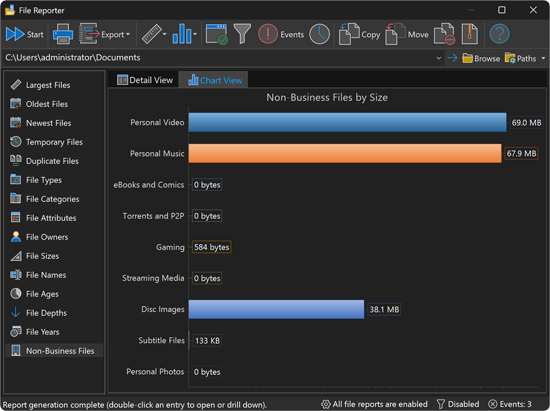
Reclaim Storage from Non-Work Content
Personal files on corporate storage are a persistent challenge for IT teams. The Non-Business Files report quantifies the problem by scanning your file systems and classifying content against a configurable set of non-business file categories. Each category shows its name, description, percentage of total, file count, size, and size on disk, sorted by storage impact.
Report columns include:
- Name - The non-business file category label
- Description - A summary of the file types included in the category
- Percentage - The proportion of total non-business storage consumed
- File Count - The number of matching files in that category
- Size - The combined logical size of all matching files
- Size on Disk - The actual allocated storage, accounting for compression and cluster alignment
Fully Customizable File Categories
Every organization has different standards for what constitutes non-business content. FolderSizes lets you define exactly which file categories are considered non-business by editing, adding, or removing categories through a built-in management interface.
Customization capabilities include:
- Edit existing non-business categories to match organizational policies
- Create new categories for emerging content types
- Add or remove specific file extensions from any category
- Define department-specific or compliance-focused classification rules
- Separate personal media, gaming, and other non-work file types into distinct groups
Drill-Down to Specific Files
Double-click any category in the report to launch a search that lists every matching file by its associated file extensions. This drill-down capability bridges the gap between high-level category statistics and the individual files that make up each group, enabling precise identification and targeted remediation. Right-click context menus provide additional options for locating file instances.
Storage Policy Enforcement
The Non-Business Files report supports IT governance and cost management objectives:
- Quantify the storage impact of personal content on corporate infrastructure
- Provide evidence for storage usage policy discussions and enforcement
- Identify storage reclamation opportunities that reduce operational costs
- Monitor compliance with acceptable use policies across file servers and shares
- Generate exportable reports for management and audit documentation
See also the File Types and File Categories reports for broader file classification, or use storage policy enforcement strategies to act on the results. Our File Reports FAQ covers common questions about non-business file detection and other report types.
Download the free trial today and take control of non-business storage consumption with FolderSizes' customizable Non-Business Files report.