
DUPLICATE FILES REPORT
FolderSizes allows you to find duplicate files with ease. Search for duplicate files on multiple drives, folders, and network shares in a single pass. Optionally remove or archive them on the spot to free up disk space.
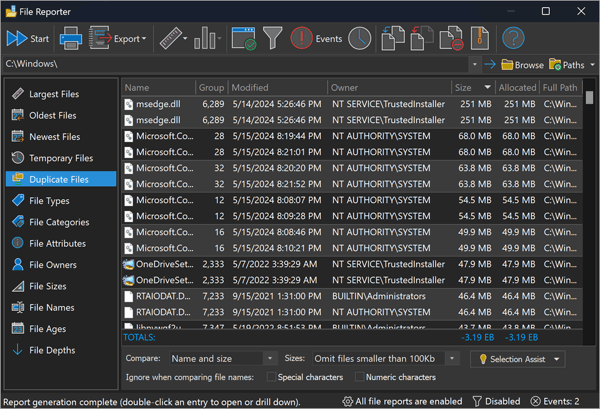
Copies accumulate everywhere: photos and videos backed up twice, documents saved to both a laptop and a file share, music libraries merged from old machines, downloads grabbed "just in case." Because each redundant copy consumes real storage, removing duplicates is often one of the quickest ways to free up space - especially on drives holding large media files.
Candidates are identified by comparing file names, sizes, and (optionally) modification date - fast criteria that work well even across large network shares, with no slow byte-by-byte content hashing required. Options are provided to ignore special and/or numeric characters when comparing names (catching copies renamed with "(1)" or "(copy)" suffixes). It's also possible to exclude files from the comparison based on size, allowing you to focus on the larger items that offer the best opportunity to reclaim disk space.
Results are grouped so every copy of a file appears together. A built-in Selection Assist button lets you choose which copies to keep across all groups at once, then delete, move, or archive the rest - with Windows Recycle Bin integration, so a mistaken removal can be undone.
See our File Reports FAQ for more about duplicate detection and the other file report types available in FolderSizes.