
FILE TYPES REPORT
The File Types report, shown below, classifies files by type based on file extension (e.g. .doc, .xls, .jpg, etc.). Complete file size, size on disk (allocated size), extension, and count information is shown for each file type.
Double-click any file type report row to view a list of files that match the associated file type.
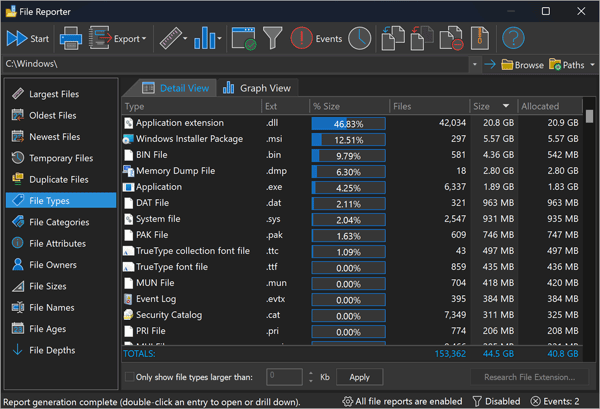
FolderSizes also offers a File Categories report, which groups file types by user-configurable categories.
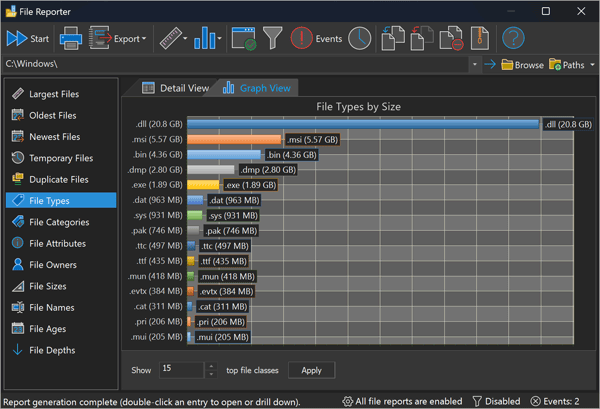
The file type graph view can switch between bar and pie graph modes. The bar graph view is shown above.
Find Out Which File Types Use the Most Disk Space
The report groups files by extension so you can see exactly how much storage each format consumes - documents (.docx, .pdf, .xlsx), images (.jpg, .png, .gif), video (.mp4, .mov), audio (.mp3), and archives (.zip, .rar). Sort by total size to find the formats eating your disk space, then drill in to the individual files behind any of them. Pair it with the File Categories report to group related extensions together, or the Largest Files report to target individual space hogs.
Common File Formats and How They Use Disk Space
Knowing the storage behavior of common file formats makes the report much easier to act on:
- Documents - Microsoft Word (.docx) and Microsoft Excel (.xlsx) files are compressed internally, so they stay compact. Portable Document Format (.pdf) files vary enormously depending on embedded images. Plain text, CSV, log, and Hypertext Markup Language (.html) files are individually tiny but often accumulate by the hundreds of thousands.
- Images - JPEG (Joint Photographic Experts Group) images use lossy compression and stay relatively small; PNG (Portable Network Graphics) and GIF (Graphics Interchange Format) use lossless compression; SVG (Scalable Vector Graphics) files are compact text. Uncompressed formats like BMP and TIFF (Tag Image File Format) can be huge - prime candidates for NTFS compression or archiving.
- Audio & video - MP3 and AAC audio files, and common video formats like MP4 (Advanced Video Coding), are already heavily compressed. A handful of forgotten videos frequently outweighs thousands of documents, which is why sorting this report by size so often surprises people.
- Archives - ZIP file, .rar, and .7z contents are already compressed, so recompressing them saves little. Going the other direction works well, though: consolidating many smaller files into a single archive reduces both clutter and per-file allocation overhead.
Once you can see which formats dominate a drive, the cleanup path is usually obvious: drill into the biggest ones, then delete, move, or archive what you no longer need.