
FILE YEARS REPORT
See File Distribution by Year
FolderSizes shows you the distribution of files by year across one or more drives, folders, devices, and network shares. Quickly identify which years account for the most storage consumption and file accumulation, enabling data-driven decisions about retention policies, archival strategies, and storage capacity planning.
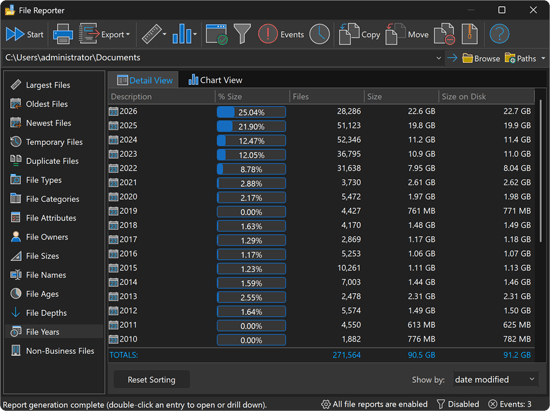
Year-by-Year Storage Visibility
The File Years report breaks down your entire file system by the year each file was created, modified, or last accessed. Instantly switch between date stamp types to analyze file distribution from multiple temporal perspectives. Each row in the report shows the year, percentage of total storage, file count, total size, and size on disk.
Report columns include:
- Year - The calendar year associated with the selected date stamp
- Percentage - The proportion of total storage consumed by files from that year
- File Count - The number of files classified under that year
- Size - The combined logical size of all files in that year
- Size on Disk - The actual allocated disk space, accounting for compression and cluster alignment
Flexible Date Stamp Classification
Choose how files are classified by year using any of the three NTFS date/time stamps:
- Date Modified - Group files by the year they were last written to, revealing when content was most actively changed
- Date Created - Group files by the year they were originally created, tracking content origination patterns
- Date Accessed - Group files by the year they were last opened or read, identifying dormant versus active content
Switch between classification modes instantly without rescanning, making it easy to compare temporal perspectives and identify content that may warrant different management actions depending on the date stamp in question.
Drill-Down to Individual Files
Double-click any year in the report to immediately launch a search that lists all matching files for that year. This drill-down capability connects high-level yearly trends directly to the specific files involved, so you can take targeted action on storage consumption without guesswork. Right-click context menus provide additional options for locating file instances.
Data Retention and Lifecycle Management
The File Years report is an essential tool for organizations managing data lifecycle policies:
- Identify years with disproportionate storage consumption for targeted cleanup
- Discover aging content that exceeds retention policy thresholds
- Track year-over-year storage growth to forecast future capacity needs
- Prioritize archival efforts by focusing on the oldest or largest year groupings
- Support regulatory compliance by verifying content age against retention requirements
Download the free trial today and gain year-by-year visibility into your storage footprint with FolderSizes' File Years report.